

What Jobsite Security Setup Really Means
Setting up jobsite security means assessing your site's risks, then layering cameras, power, monitoring, and deterrence into one plan. That plan protects the site after hours and documents it by day.
OxBlue organizes that plan around a framework called detect, deter, and defend. Cameras and AI-filtered alerts detect activity, lights and sirens deter it, and verified monitoring defends the site by sending help when a threat is real.
You also don't need separate cameras for security and progress. OxBlue's jobsite security monitoring uses the same hardware to guard an empty site at night and capture progress photos while crews work.
Each step below builds on the one before it, so by the end you have one connected plan your team can run.
Step 1: Assess the Risks on Your Specific Site
Walk the site before you place a single camera. Start with what a thief would want: equipment yards, laydown areas, material storage, and tool trailers.
Then mark every entrance and exit, any open stretch of perimeter, and each blind spot someone could use to get in unseen.
Timing matters as much as location. Sites face the most risk when they sit empty, so plan your coverage around nights and long holiday weekends.
The theft data backs this up. Over the 2024 Labor Day holiday period, NER recorded 217 equipment theft incidents totaling $5,827,459 in losses, according to NER's 2024 Labor Day theft report. That was part of a five-year rise in holiday-period thefts.
Sketch what you find as you walk. A simple map of targets, access points, and empty hours becomes your camera placement plan in Step 2.
Why the Stakes Justify a Plan
Equipment theft costs enough to justify planning ahead. National Equipment Register estimates put heavy equipment theft at approximately $300 million to $1 billion every year.
That range covers heavy equipment only. It doesn't count stolen tools or materials, so the full cost of jobsite theft runs higher.
Step 2: Choose the Right Cameras for Each Zone
Match each camera to the job its zone needs. OxBlue's construction security cameras come in three formats, and each one covers a different kind of area.
Static infrared cameras watch a fixed point, like a gate or trailer door, and see well in low light. PTZ cameras pan and zoom across wide, changing areas, with long-range optical zoom that pulls in detail from a distance. MultiCam systems put up to three infrared cameras on one unit to cover a broad perimeter from a single mount.
Placement decides whether footage holds up later. Mount cameras high enough to resist tampering, and angle them to capture faces and plates, not only movement.
DORI ratings help you judge clarity. They describe the distance at which a camera can detect, observe, recognize, or identify a person. OxBlue's guide to choosing the right security cameras covers resolution, DORI, and mounting in more detail.
Build a Layered Defense
No single camera covers a whole site, so layer them. Static cameras hold the fixed points while PTZ cameras sweep the areas that change as work moves. MultiCam units stretch across long perimeters and close the gaps the other two leave.
Treat each zone as a checkpoint and decide what it needs before you buy. Use OxBlue's checklist to audit your jobsite defense plan zone by zone, then see how the formats work together in the Sapphire video and security systems lineup.
Step 3: Plan Power and Connectivity
Many sites have no grid power or reliable Wi-Fi on day one, so solve both before install day. Every OxBlue camera includes built-in 4G LTE cellular and connects without jobsite internet. You can put a camera up the day the site opens, long before utilities arrive.
For power, solar panels with battery backup keep cameras running in corners where a cord won't reach. OxBlue cameras work with solar, so review the solar-powered camera options for off-grid spots.
Mount the panel where it gets steady sun, clear of tower cranes and stacked material. A charged battery keeps the camera recording through cloudy days and long nights. Check the panel again as the building goes up, since new floors and stockpiles can shade it.
Step 4: Pick Your Monitoring Level
Your monitoring level decides what happens when a camera sees something. With self-monitoring, AI-filtered motion alerts go straight to your phone, and you decide how to respond.
With professional monitoring, certified agents check each alert on live video. They dispatch help when the threat is real.
Video verification is what separates the two. An agent watching the live scene can tell an intruder from a stray animal before anyone calls the police. That matters because most alarms are wrong. As a DOJ guide on false burglar alarms, published in 2007, put it: "The vast majority of alarm calls—between 94 and 98 percent (higher in some jurisdictions)—are false."
OxBlue builds both options into its service tiers. Detect includes motion detection and AI object filtering, and self-monitored motion alerts come at no extra charge. Defend adds professional monitoring with dispatch, starting at $95 per month. OxBlue's guide to DIY and professional monitoring compares the two in more detail.
Some teams come to security from the other direction. They install a camera for progress and find it does both jobs.
"It was an added benefit to use the camera for security. We could see unauthorized people on the cameras and we could monitor for vandalism." Gary Mohler, City Construction Manager, City of Modesto
The people behind the monitoring matter too. OxBlue's in-house, US-based support agents complete more than 1,600 hours of training and act as your 24/7 camera manager. They also run health checks on your cameras, so a problem gets caught before it leaves a gap in your footage.
Why Verified, Active Monitoring Matters
Live monitoring lets someone act while an intruder is still on site, instead of finding the damage in the next morning's footage.
The US Office of Justice Programs published a 2019 study on this. In a 40-year review of CCTV surveillance, it found that "CCTV schemes incorporating active monitoring generated larger effect sizes than did passive systems."
Cameras that someone watches reduce crime more than cameras that only record. That's the reason to pair your hardware with a monitoring plan.
Step 5: Add Deterrence Hardware and Tie It to Insurance
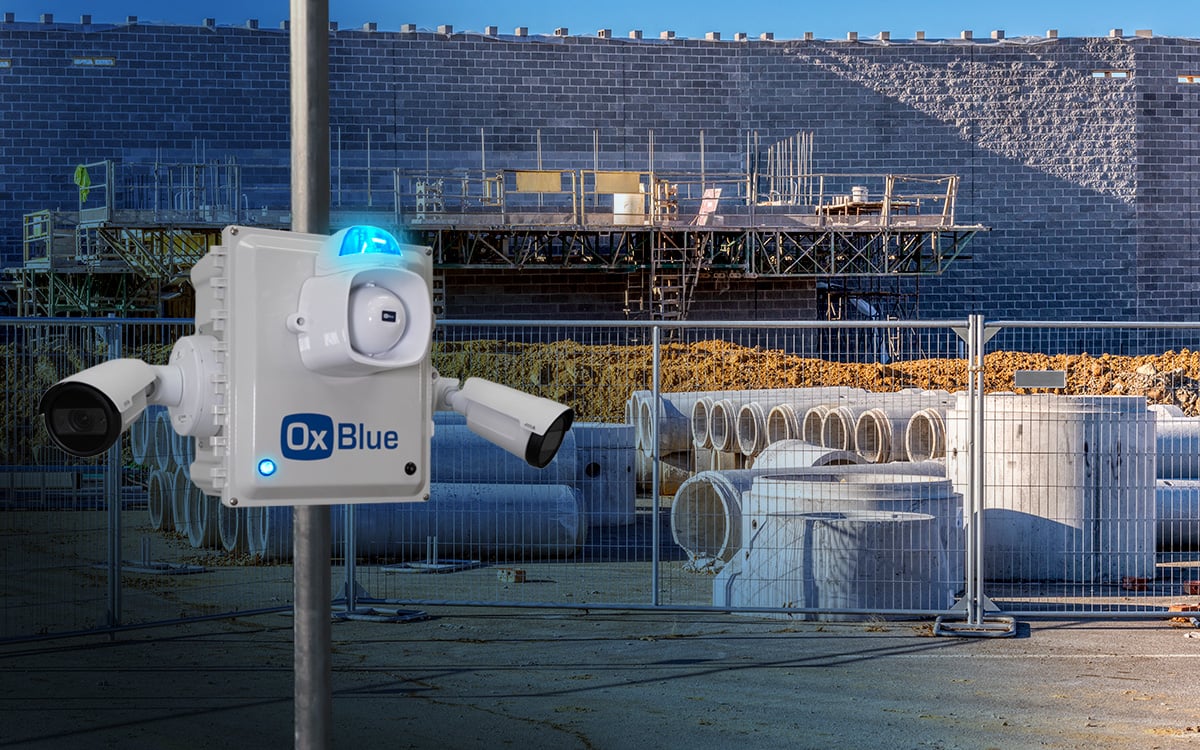
Deterrence aims to turn someone around before they reach your equipment. OxBlue's options include a blue strobe light, a siren, talk-down audio, an anti-tamper switch, and onboard battery backup.
No camera stops every theft. Deterrence makes your site a harder target, and a visible camera does much of that work on its own.
"Having an OxBlue camera is a deterrent against theft and vandalism. The camera was in an obvious place and covered the property, so it was helpful with security." Bill Bostleman, Founder of River Rock Property Group
OxBlue designs its visible deterrence and verified monitoring to support Builder's Risk Insurance requirements. Ask your broker which requirements apply to your policy before install day.
That documented record can also help at renewal, as one developer describes.
"The cameras not only help protect us from theft and faulty insurance claims but they also help lower our insurance premiums for having site monitoring during construction." Ankit Patel, Development Manager, Peachtree Hotel Group
Here is how monitored cameras compare with the two options most sites weigh against them.
|
Option |
Coverage |
Cost Pattern |
Response |
Documentation |
|---|---|---|---|---|
|
Recorded-only cameras |
Capture footage for later review |
Low upfront, little ongoing cost |
After the fact, once someone checks the video |
Stored clips you pull by hand |
|
Live monitored cameras |
Agents watch alerts as they happen |
Monthly service, starting at $95 |
Real-time verification and dispatch |
Timestamped video with verified event logs |
|
On-site guards |
One person covers a set route |
Hourly wages for every shift covered |
Immediate, but only where the guard stands |
Written logs with limited visual proof |
Step 6: Use the Same System to Document Progress and Safety
The camera you install for security keeps working during the day. The same feed that guards an empty site at night captures progress photos and live views while crews work.
When a dispute comes up over what happened and when, you can go back and look at the timestamped footage. A change-order argument becomes a quick video check.
"If there was any sort of delay charges that we incurred from subcontractors, we were able to go back and say, no, it was ready. Look. So this is not on us." Jacob Cannell, Project Manager, FCI Constructors
Daytime visibility also supports safety. The BLS Census of Fatal Occupational Injuries reported that construction and extraction workers experienced 1,032 fatalities in 2024. Fatal falls, slips, and trips among these workers decreased 7.5 percent to 370 in 2024 from 400 in 2023, which still accounts for more than a third of those deaths.
Falls also top the compliance list. Fall Protection (29 CFR 1926.501) was the most frequently cited OSHA standard across all industries in fiscal year 2025, according to OSHA's most-cited standards.
A superintendent checking the live view can spot an unprotected edge or a worker who isn't tied off and get it fixed before someone gets hurt. OxBlue's AI safety tracking adds a second check by flagging missing hard hats and high-vis vests.
You can also share a live link or a saved clip with an owner or insurer in seconds. Their question gets answered without anyone driving to the site.
Frequently Asked Questions
Are Construction Sites Monitored at Night?
Yes, and night is often the riskiest window, since a site usually sits empty once crews leave. Professional agents can watch motion alerts around the clock and verify a threat on video before dispatching help.
How Much Does Jobsite Security Cost to Set Up?
Cost depends on how many cameras and zones your site needs, so OxBlue quotes each project. Professional monitoring starts at $95 per month, and self-monitored motion alerts come at no extra charge.
Do Security Cameras Help With Builder's Risk Insurance?
Yes, visible cameras and documented monitoring support Builder's Risk Insurance requirements, and one OxBlue customer credits site monitoring with lowering the company's premiums. Check with your broker for the requirements on your specific policy.
Is Live Monitoring Better Than an On-Site Guard?
Live monitoring covers every camera's view at once and keeps a timestamped record of each event. A guard responds immediately but only where they stand, so many sites use monitoring for broader coverage.
Conclusion: Turn a Camera Setup into a Security Plan
Each of the six steps feeds the next. The risk walk tells you where cameras go, power and connectivity decide how fast they go up, and monitoring and deterrence decide what happens when someone shows up after hours.
By day, the same cameras keep a record of progress and safety on the job.
The best time to set this up is before your site's next empty stretch. Holiday-period thefts have risen for five years, so if crews will be off for Thanksgiving or the year-end break, get coverage in place before they leave.
OxBlue's in-house team acts as your camera manager, handling health checks and monitoring so your crew can focus on the build. Talk to OxBlue about a security plan for your site.